A website can be complicated.
First… How does a website "magically appear" on the Internet?
A domain name (aka: the website address, URL Universal Resource Locator) is your license to reside on the World Wide Web / the Internet. Think of a domain name like the license plates on your car. You don't "own" them per-say - but they are yours. You "renew" your license plate each year or so... Domain names work in the same way. The DMV is to your license plate what a Registrar (GoDaddy.com / Register.com) is to your domain name.
So you have a registration (registered URL: “webdevgmu.qsh.es”). Next you need a place to host your site. A Web Host is a company that provides space on a Web server. This is where you place your code (HTML, Images, CSS, Script, ASP, XML, Flash, etc.) files. Once your files are on the Web Server, the host server maps your registered URL to an IP Address (internet protocol: 999,999,999,999), and now you have an active site.
Web Servers come in several varieties, and you need to think about what type you want to use. (i.e. IIS for ASP, WebSphere or Tomcat for Java). Servers allow for Server-side scripts that are specific to the type of server configuration. But, once you select the type of server you want to use, they all serve standard code to the client’s browser.
Browsers also run code, and (for the most part) all browsers handle the same code types: HTML, CSS, XML, Flash (as an executable), and more.
Next… What lies just under the hood of a website?
Your web site is a massive organization of files and folders. Organization is the key word in this definition. Although a web site may be as simple as one page consisting of one file, most web sites are far more complex and must be carefully architected, planned, and maintained.
A web site needs a home page: a page that is indexed by the hosting site as the 1st point of contact when your URL is selected. There is no rule for naming a home page, but some host requires one of the more standard naming formats (such as index.html or default.htm).
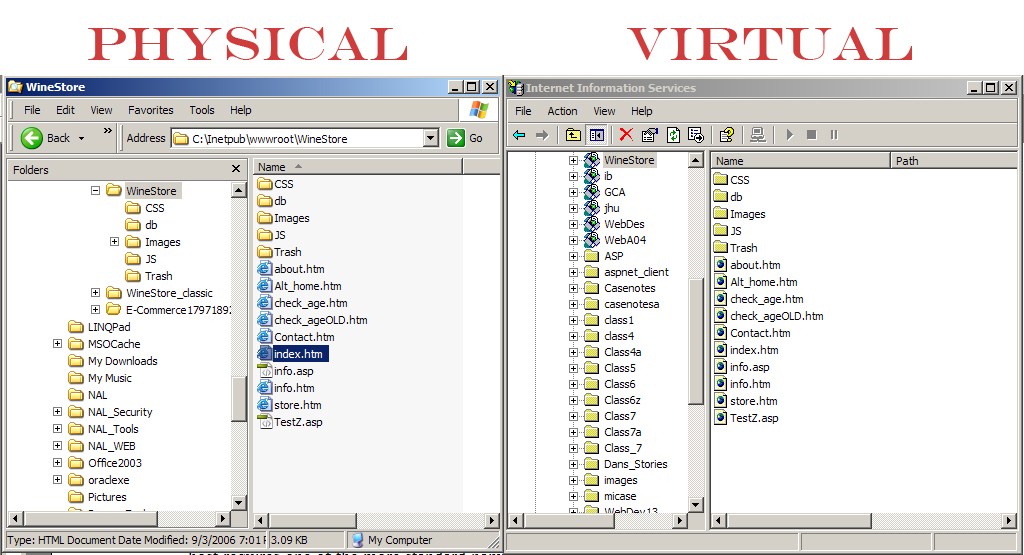
A web site is generally separated into Logical Sections; these sections are called subdirectories. A subdirectory is nothing more than a folder that is logically mapped by the web server. A site can then be mapped (virtually and physically) to these folders and the files in each.
A site map can also be a depiction of the logical flow of pages on a site
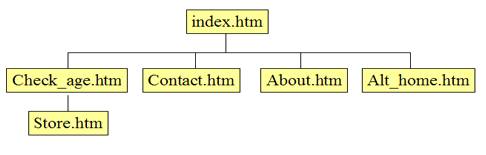
The organization of a web also contains folders for types of files.
These folders may contain such groupings as:
The organization of a web site will also include a conscious decision to use scripts for dynamic presentation. This is the ability to interact with users. Some scripts run on the browser, and others run on the server. This is known as Client-side Vs Server-side scripting.
Client side scripts:
Server-side scripts
This difference is of vital importance when making a choice between client and server-side scripting solutions for your project. Always consider using the clients’ resources first. As a developer you need to keep your Web server running at maximum capacity.
To move forward with designing and developing a successful web site it is important to plan carefully how your site will be organized.
Types of Web Sites
There are various types of Web Sites ranging from personal to E-Commerce sites
Designing a site depends on the type of site you want to present.